
Search Results
XHanch – WP Anime – WordPress Plugin To Turn Your WordPress Website Into An Anime Website
Overview | Features | Demo | Forum | FAQs | Testimonials | Changelog | Order Now
Professional, Powerful, And The Best Anime / Video Streaming / Movies/ Dramas Website Script
Are you planning to run a anime / video streaming / movies / dramas website with the easiest, fastest, friendliest and professional way?
WP Anime is the best option for you.
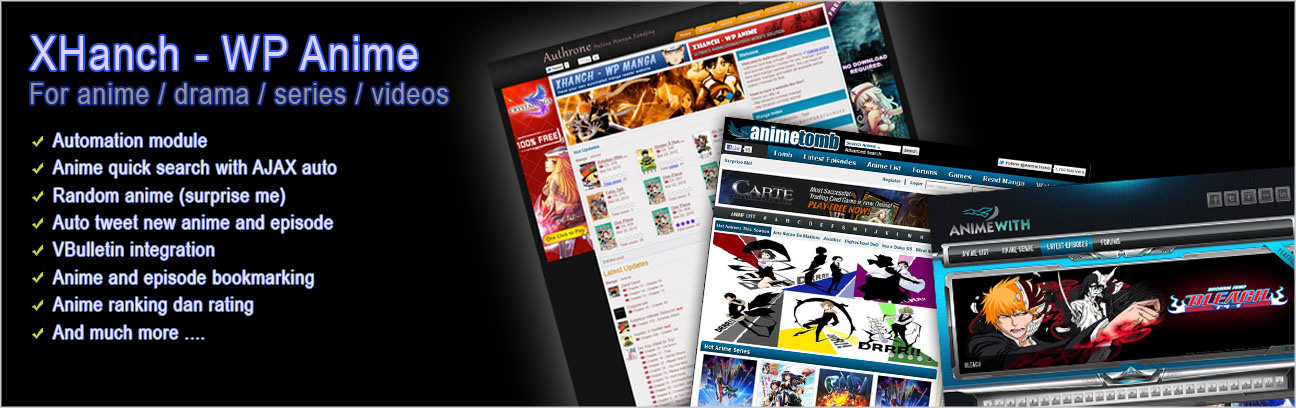
The best part of WP Anime is to let you have a fully automated anime/video website (with our crawler engine), so that you don’t have to add anime/video and contents manually. Since it is a WordPress plugin, you can easily set it up just in several steps. You will also be able to choose thousands of free themes available or you can use your own theme and you can use other plugins to enhance your website in the easiest way. For example: you can use WP Super Cache to speed the load of your website, ads manager and so on.
With this solution, you can easily own an anime / video streaming / movies / dramas website with thousands of anime series
Other Usage
This script/plugin can also be used for other than manga website. You can also use this script for video gallery, movies, dramas, films, and other website types with similar concept.
Demo Website
Here is a demo site that installed WP Anime:
Click here to go to the demo site
General Features
- Lots of anime / videos / movies / dramas sources to allow you to have over thousands of anime / videos / movies / dramas
We provide optional scrapper module with lots purchasable scrapper engine add-ons which would allow you to have thousands of anime / videos / movies / drama series. We will keep building new engines so you can have even more anime / videos / movies / drama series for your website. - Crawler/scrapper engine
This is the key of the automation. Just select which anime / videos / movies / drama series you wish to add to your collection and let the crawler work for you. - Powerful and professional admin pages
WP Anime provides well-designed and well-made admin pages so that the site administrators can manage everything (anime / videos / movies / dramas, episodes, categories, tags, and so on) easily. - Active development
WP Anime will be always keep improved, optimized and flooded with new features to spoil our customers. You can see here for the complete change/update logs of WP Anime - Easy setup
You can easily set up this plugin on your wordpress just by following several steps provided on the Instruction page. For your information, you can simply ask us to set it up for you. - Stable, light weight, and Reliable
WP Anime has been tested very well and has been used by lots of satisfied buyers. There is also an intensive internal caching system and optimized SQL implementation in WP Anime that make WP Anime light weight. - Template system
Template system make you easier to modify/customize the look of anime series and episodes listing, search form, anime / videos / movies / dramas player, widgets and other stuffs provided by WP Anime. With this, you can even have a completely different layout/presentation. Therefore, you can personalize your own anime website. - Add-ons/Modules system (Modular)
WP Anime is a modular and extensible WordPress plugin since it has its own module/add on system. To add new features, you may just purchase and install required modules/add ons. Currently we have ready-to-use and well-made modules to add membership functionality, to enable members to upload and manage their own anime / videos / movies / dramas, to enable automated anime / videos / movies / dramas website, to host/upload episodes in several languages, to intergate your WordPress with your VBulletin forum, and many more. - Informative interface
WP Anime provide a very nice layout and user friendly interface. There are also tooltips applied to the listing to have more information - Stand Alone
WP Anime has its own system to show the anime / videos / movies / dramas and other WP Anime pages. WP Anime does not use WordPress posts and Categories. Therefore, you can have all the blogging capability/features to publish articles. - Dynamic
The structure of your website will be dynamic. You can have your own structure of your anime / videos / movies / dramas website. - Search engines friendly (SEO optimized)
WP Anime is SEO optimized since it uses optimized valid w3c XHTML codes, auto generated meta tags, and permalink urls(search engine friendly urls). You can even customize the meta descriptions, page title and keywords for every anime / videos / movies / dramas and every episodes. And, all of them can be easily configured via our configuration manager. - Clean code
WP Anime is very well written and applies good coding structure that makes it stable and maintainable. It consists of several layers to handle the core process, theme system, module/add on system, page, and widgets - Active community and supports
We provide an exclusive community center (forum) for WP Anime customers. You will be able to find useful customizations articles and other articles related to WP Anime. Also, feel free to post your questions related to WP Anime there (we always reply to every query). - Feels the power of WordPress
You can add WordPress plugins (to add banners/ads, integrated forum, contact form, google analytics, cache system, SEO plugins, quote of the day, chat, and lots more) to make your anime website even more contented, powerful, rich-features.
Click here to see complete features of WP Anime
Other Benefits
These are guaranteed benefits for our customers who purchased WP Anime:
- FREE upgrades/updates: we will improve WP Anime to make it even powerful in the future and our customers will get these updates/upgrades for free (depend on your package)
- FREE support: just contact us if you have any question, problem, or suggestion regarding WP Anime (depend on your package)
- We may do some modifications requested by you: we may do these custom requests for free or for extra charges as it will improve WP Anime
Have something to ask?
Feel free to send your question via contact form.
You may also visit our WP Anime Forum to post your question or get more information.
Our Offers
We realized the differences in need for each person so that we offer our best offers in several packages/plans. Check out these offers for WP Anime.
XHanch – WP Manga – WordPress Plugin To Turn Your WordPress Website Into A Manga / Comic / Komik / Webtoon / Manhwa / Gallery / Photo Album Website
Overview | Features | Forum | FAQs | Testimonials | Changelog | Order Now
Professional, Powerful, And The Best Online Manga/Manhwa/Komik/Comics Reader/Viewer / Photos/Pictures/Images Album Gallery Website Script.
Are you planning to run an online manga/manhwa/comics/komik reader/viewer or photos/pictures/images album gallery Website website with the easiest, fastest, friendliest and professional way?
WP Manga is the best option for you.
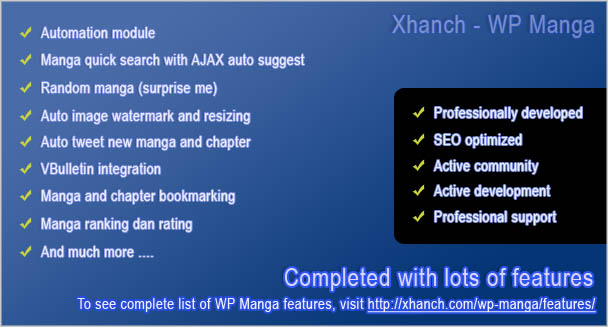


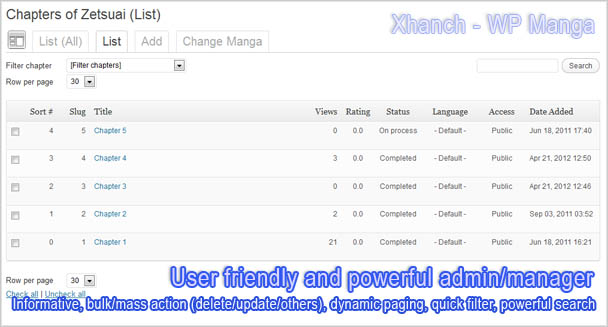
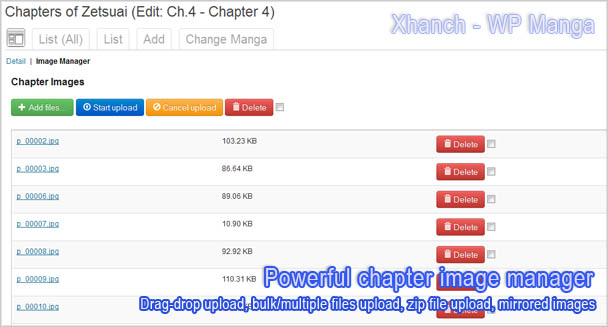


The best part of WP Manga is to let you have a fully automated manga website (with our crawler engine), so that you don’t have to add manga and contents manually. Though, you still can add manga and chapters manually. WP Manga is completed with a user friendly and powerful managers to manage your contents. Since it is a WordPress plugin, you can easily set it up just in several steps. You will also be able to choose thousands of free themes available or you can use your own theme and you can use other plugins to enhance your website in the easiest way. For example: you can use WP Super Cache to speed the load of your website, ads manager and so on.
With this solution, you can easily own a manga website with thousands of manga/manhwa/comics/komik series and photos/pictures/images albums gallery
Other Usage
Well, this script can be used for other than manga website. You can also use this script for comic or comic strips, images/photos/pictures albums/galleries, portfolios, and other website types with similar concept.
General Features
- Lots of manga sources to allow you to have over thousands of mangas
We provide optional scrapper module with lots purchasable scrapper engine add-ons which would allow you to have thousands of manga series. We will keep building new engines so you can have even more mangas series for your website. You can even determine whether to store the scrapped images on your server or not (Mirrored). If not, the script will only stores image URLs so the manga reader will load the images directly from it’s source. You can also store scrapped images to another server - Crawler/scrapper engine
This is the key of the automation. Just select which mangas you wish to add to your collection and let the crawler work for you. - Powerful and professional admin pages
WP Manga provides well-designed and well-made admin pages so that the site administrators can manage everything (mangas, chapters, categories, tags, and so on) easily. - Active development
Since WP Manga has been used by 100+ customers. WP Manga will be always keep improved, optimized and flooded with new features to spoil our customers. You can see here for the complete change/update logs of WP Manga - Easy setup
You can easily set up this plugin on your wordpress just by following several steps provided on the Instruction page. For your information, you can simply ask us to set it up for you. - Stable, light weight, and Reliable
WP Manga has been tested very well and has been used by lots of satisfied buyers. There is also an intensive internal caching system and optimized SQL implementation in WP Manga that make WP Manga light weight. - Template system
Template system make you easier to modify/customize the look of mangas and chapters listing, search form, manga reader, widgets and other stuffs provide by WP Manga. With this, you can even have a completely different layout/presentation. Therefore, you can personalize your own manga website. - Add-ons/Modules system (Modular)
WP Manga is a modular and extensible WordPress plugin since it has its own module/add on system. To add new features, you may just purchase and install required modules/add ons. Currently we have ready-to-use and well-made modules to add membership functionality, to enable members to upload and manage their own mangas, to enable automated manga website, to host/upload chapters in several languages, to intergate your WordPress with your VBulletin forum, and many more. - Informative interface
WP Manga provide a very nice layout and user friendly interface. There are also tooltips applied to the listing to have more information. - Stand Alone
WP Manga has its own system to show the mangas and other WP Manga pages. WP Manga do not use WordPress posts and Categories. Therefore, you can have all the blogging capability/features to publish articles. - Dynamic
The structure of your website will be dynamic. You can have your own structure of your manga website. You even can have similar structure as Mangafox.com, Mangahere.com. OneManga.com, Mangable.com, Mangathat.com or others. - Flexible manga chaptering
Support non numerical manga chaptering so that you can have chapter like “Extra 01”, “Extra 02”, “Special 01”, etc. - Search engines friendly (SEO optimized)
WP Manga is SEO optimized since it uses optimized valid w3c XHTML codes, auto generated meta tags, and permalink urls(search engine friendly urls). You can even customize the meta descriptions, page title and keywords for evey manga and chapter. - Clean code
WP Manga is very well written and applies good coding structure that makes it stable and maintainable. It consists of several layers to handle the core process, theme system, module/add on system, page, and widgets - Active community and supports
We provide an exclusive community center (forum) for WP Manga customers. You will be able to find useful customizations articles and other articles related to WP Manga. Also, feel free to post your questions related to WP Manga there (we always reply to every query). - Feels the power of WordPress
You can add WordPress plugins (to add banners/ads, integrated forum, contact form, google analytics, cache system, SEO plugins, quote of the day, chat, and lots more) to make your manga website even more contented, powerful, rich-features.
Click here to see complete features of WP Manga
Other Benefits
These are guaranteed benefits for our customers who purchased WP Manga:
- FREE upgrades/updates: we will improve WP Manga to make it even powerful in the future and our customers will get these updates/upgrades for free (depend on your package)
- FREE support: just contact us if you have any question, problem, or suggestion regarding WP Manga (depend on your package)
- We may do some modifications requested by you: we may do these custom requests for free or for extra charges as it will improve WP Manga
Have Something To Ask?
Feel free to send your question via contact form..
You may also visit our WP Manga Forum to post your question or get more information.
Our Offers
We realized the differences in need for each person so that we offer our best offers in several packages/plans. Check out these offers for WP Manga.

WordPress Website – Charu Toys
Charu Toys is a website that uses our WP Online Store to sell toys, collectibles and action figures.
View full post …
WordPress Website – Otaku FR
Otaku FR is a website that uses our WP Anime to provide a place to watch anime series and episodes online.
View full post …
Glossy Bright
A premium WordPress theme with elegant and glossy bright sensation. Features of this WordPress theme:- Multiple page templates (with and without sidebar)
- Stylish menu
- Inline search Form
- Inline user login form
- Table-less, valid W3C XHTML/CSS
- Widget Ready with 4 available sidebars: Right Sidebar, Top Sidebar, Content Top Sidebar, Content Bottom Sidebar
- Single level menu generated from pages
XHanch – My Twitter – Complete Features
Overview | Features | Forum | Installation | Changelog | Download
Here are complete features offered by XHanch – My Twitter – WordPress plugin:
- Display a number of latest tweets
- Display your retweets
- Display/hide or include/exclude replies from other members to you
- Display/hide or include/exclude replies from you to other members
- Post a tweet/status from your website where the widget is placed (The form to post a tweet/status will only available/appear if you are already logged in to your wordpress as administrator).
- Automatically post a tweet/status as you publish a new page/post.
- Import/store tweets to your own database based on specified interval.
- Display tweets that only contain certain words.
- Display tweets that do not contain certain words.
- Display/hide user’s profile picture/avatar or you may just show the name instead of picture
- Hide hash tags when displaying your tweets (optional).
- Changeable avatar’s size
- Display/hide post date(changeable format and layout)
- Display date time based on timezone setting on your WordPress
- Convert all url, @username, #tag(hash tags) to click-able links
- Convert URLs to click-able links
- Implemented OAuth authentication system
- Connect to your Twitter account via Oauth for more functionality
- Show your direct messages
- Flexible way to show your tweets since you can arrange your tweet content
- Format the auto tweet content
- Show how/where a tweet is posted
- Multi widget support
- Multiple profile system that will let you put multiple Xhanch – My Twitter widgets with separate settings for each widget. Each new profile will provide a new Xhanch – My Twitter widget
- Export/download/backup profiles
- Import/restore profiles
- Retweet link for every status
- Status Reply link for every status
- View Status link for every status
- Cache System; activate it via the configuration page
- Display a number of your followers, total statuses/tweets, favorites, and friends
- Display your join date to twitter and full name on Twitter
- Shortcode is available to display your tweet list within a post or page (Click here to read how to use the shortcode).
- Tweet ordering: you may display your tweets from oldest to latest or from latest to oldest
- Convert smilies/emoticon syntax to smilies/emoticon images
- Display custom texts(can be HTML code) before and after the tweets list.
- Wrap long word in tweets into multiple lines so that it won’t be displayed outside the box/area anymore
- Choose one of available header styles that suits your taste
- Generates very clean, table-less and valid W3C XHTML codes.
- You can activate scrolling mode to save space on your webpage and to display more tweets
- Personalize the layout of the widget by adding custom CSS codes
- Truncate long tweets after certain amount of characters
- Theme friendly
- Optimized and very efficient SQL queries and performance
Xhanch My Twitter – Requirements, Installation & Configuration
Overview | Features | Forum | Installation | Changelog | Download
Requirements and Notice
Before you say/assume that this plugin/widget is not working or you encounter an error, check these out:
- PHP 5 or later is recommended. Though, this plugin may run on PHP 4.
- Your web server must support/provide PHP CURL extension and SimpleXML
- Make sure you only type in your twitter username in the username field. Not your twitter email and without the @ tag. Just the username.
- In case you encounter a messed up or strange layout, it means that your WordPress theme is not compatible. You may ask us to fix that for you
Installation
- Download and unzip the package.
- Upload/FTP the entire “xhanch-my-twitter” directory to your /wp-content/plugins/ directory on your blog
- Activate the plugin on the “Plugins” tab of the administration panel.
- Open Xhanch -> My Twitter from your WP admin area to access the configuration page
- Define your configurations there. Optionally, you can create other profiles.
- Open the widget manager and place “XMT: Latest Tweets” widget to certain sidebars as you wished and choose a profile for that widget
To enable the smilies, you need to update your “Formatting” in “Settings” -> “Writing”. Make sure “Convert emoticons like : – ) and : – P to graphics on display” is checked.
To put it within your post or page
You just need to add this simple code within your post or page content
[xmt profile=<profile name>]
You can have some parameters to it. Here’s the complete syntax
[xmt profile=<profile name> before_widget=”” after_widget=”” before_title=”” after_title=””]
Replace <profile name> with an Xhanch – My Twitter profile name you wish to show
For WordPress Themes Without Dynamic Sidebar
You can use our template code
<?php
    $args = array(
        'before_widget' => '',
	'after_widget' => '',
	'before_title' => '',
	'after_title' => '',
    );
    xmt($args, '<profile name>');
?>
While the configuration will be done via the configuration page at the admin area (Xhanch -> My Twitter).
Settings and Configuration
Once this plugin installed, My Twitter will be listed on your widgets so you can determine where to place it. The configuration page can be found on the left menu, Xhanch -> My Twitter
Add Profiles
Profile name must only contain alphanumeric characters (A to Z and 0 to 9).
Profile name will identify every Xhanch – My Twitter widgets.
Profile Configuration
Widget Setting
- Title: optional, the title of the widget
- Name: optional, your name
- Header style: required, choose one of available header styles that suits your taste
- Turn title to link: optional, check it to convert the widget title into click-able link
- Header text: optional, add some text (can contain HTML codes) before the tweets list. There are some available variables related to your twitter account that can be placed on this part.
- Footer text: optional, add some text (can contain HTML codes) after the tweets list. There are some available variables related to your twitter account that can be placed on this part.
Tweet Settings
- Username: required, username of your twitter account. Please don;t use your twitter’s email address
- Password: optional, password of your twitter account to enable more functionalities
- Tweet order: required, you may display your tweets from oldest to latest or from latest to oldest
- # Latest tweets: required, maximum number of tweets to show
- Inc. replies to you: optional, check it to display/hide or include/exclude replies from other members to you
- Inc. replies from you: optional, check it to display/hide or include/exclude your replies to other members
- Inc. retweet: optional, check it to display/hide or include/exclude your retweets
- Show origin retweet: optional, check it to display/show the original retweeted tweets
- Date format: required, hide the date or display the date in a preferable format. My Twitter provides quite a complete collections on how to display the post date.
- GMT add: optional, put in the difference (in minutes) between the displayed time and your local timezone.
- Tweet layout: required, determine how should Xhanch – My Twitter display your tweet. There are several useful variables provided, which are: @name, @name_plain, @tweet, @date, @source, @reply_url, @reply_link, @retweet_url, @retweet_link and @status_url
- Show Divider Line: optional, check it to display a divider line between the tweets in the list.
- Click-able URL: optional, check it to convert URLs in your tweets into click-able links.
- Click-able user tag: optional, check it to convert user tags (@user) into click-able links.
- Click-able hash tag: optional, check it to convert hash tags (#topic) into click-able links.
- Display URL as: optional, check it to replace the links to a text when displaying your tweets.
- Show hash tag: optional, check it to show the hash tags when displaying your tweets.
- Show avatar: optional, check it to show avatar for each tweets
- Avatar size: optional, set the avatar’s size. If you want to use the default size, just leave these settings blank/empty
- Enable cache: optional, check it to activate the cache system
- Cache expiry: optional, how many minutes will the cached tweets be considered as expired. It will refresh the cache as it gets expired
- Import tweets every: determine the period/interval (in minutes) to import your tweets to the database.
- Truncate tweet after: optional, show certain amount of characters of your tweet. Set it to “0” to disable this tweet truncating
- Ellipsis: optional. The value of this setting will be displayed for every truncated tweet
Advanced Features
You will need to create a Twitter application or you can use an existing one if you already have it. Don’t worry, it should be very simple. Just follow the provided steps on the configuration page.
If you successfully get connected, you can also make a tweet from your website where you place the widget if you are logged in as administrator.
- Show post a tweet form: optional, check it to display a form to post a new tweet/status when you are currently logged in to your WordPress website as Administrator
- Show direct messages: optional, check it to display your direct message
- Post a tweet as you publish a new page/post: optional, check it to automatically post a tweet as you publish a new page/post
- Auto Tweet layout: optional, format the content of your auto tweet
Display Mode
- Selected Theme: required, determine how your tweets will be displayed.
Scrolling option (only applied when selected mode is scrolling)
- Area Height: required when scrolling mode is enabled, specify the max height or the tweets list are to display a scroll bar. So, the scroll bar will only appear when the height of the list has reached or over this value.
- Animate scrolling: optional, check it to animate the scrolling mode
- Scroll amount: required when animate scrolling is enabled, this is the height (px) to be scrolled for every ms specified in scroll delay. For example, if the scroll amount is 2, then it will scroll up for 2px for every ms specified in scroll delay.
- Scroll delay: required when animate scrolling is enabled, this is to determine the speed of scrolling. Its value is in milliseconds ms).
- Scroll direction: required when animate scrolling is enabled, this is to determine the direction of scrolling.
CSS
- Custom CSS: optional, add CSS codes to personalize/modify the look of the widget.
Other Settings
- Open link on new tab: optional, check it to make all links to be opened on new tab or window.
- Show credit: optional, give us a back link. (We will appreciate those who give us a credit as your gratitude)

PSD To HTML / CSS – Party Organizer
A set of “Party Organizer” webpages coded by Xhanch Studio from two PSD files.
View full post …
PSD To HTML / CSS – The Tunica
A set of “The Tunica” webpages coded by Xhanch Studio from two PSD files.
View full post …WP Anime – Complete Features
Overview | Features | Forum | FAQs | Testimonials | Changelog | Order Now
General Features
- Lots of anime / videos / movies / dramas sources to allow you to have over thousands of anime / videos / movies / dramas
We provide optional scrapper module with lots purchasable scrapper engine add-ons which would allow you to have thousands of anime / videos / movies / drama series. We will keep building new engines so you can have even more anime / videos / movies / drama series for your website. - Crawler/scrapper engine
This is the key of the automation. Just select which anime / videos / movies / drama series you wish to add to your collection and let the crawler work for you. - Powerful and professional admin pages
WP Anime provides well-designed and well-made admin pages so that the site administrators can manage everything (anime / videos / movies / dramas, episodes, categories, tags, and so on) easily. - Active development
WP Anime will be always keep improved, optimized and flooded with new features to spoil our customers. You can see here for the complete change/update logs of WP Anime - Easy setup
You can easily set up this plugin on your WordPress just by following several steps provided on the Instruction page. For your information, you can simply ask us to set it up for you. - Stable, light weight, and Reliable
WP Anime has been tested very well and has been used by lots of satisfied buyers. There is also an intensive internal caching system and optimized SQL implementation in WP Anime that make WP Anime light weight. - Template system
Template system make you easier to modify/customize the look of anime series and episodes listing, search form, anime / videos / movies / dramas player, widgets and other stuffs provided by WP Anime. With this, you can even have a completely different layout/presentation. Therefore, you can personalize your own anime website. - Add-ons/Modules system (Modular)
WP Anime is a modular and extensible WordPress plugin since it has its own module/add on system. To add new features, you may just purchase and install required modules/add ons. Currently we have ready-to-use and well-made modules to add membership functionality, to enable members to upload and manage their own anime / videos / movies / dramas, to enable automated anime / videos / movies / dramas website, to host/upload episodes in several languages, to intergate your WordPress with your VBulletin forum, and many more. - Informative interface
WP Anime provide a very nice layout and user friendly interface. There are also tooltips applied to the listing to have more information - Stand Alone
WP Anime has its own system to show the anime / videos / movies / dramas and other WP Anime pages. WP Anime does not use WordPress posts and Categories. Therefore, you can have all the blogging capability/features to publish articles. - Dynamic
The structure of your website will be dynamic. You can have your own structure of your anime / videos / movies / dramas website. - Search engines friendly (SEO optimized)
WP Anime is SEO optimized since it uses optimized valid w3c XHTML codes, auto generated meta tags, and permalink urls(search engine friendly urls). You can even customize the meta descriptions, page title and keywords for every anime / videos / movies / dramas and every episodes. And, all of them can be easily configured via our configuration manager. - Clean code
WP Anime is very well written and applies good coding structure that makes it stable and maintainable. It consists of several layers to handle the core process, theme system, module/add on system, page, and widgets - Active community and supports
We provide an exclusive community center (forum) for WP Anime customers. You will be able to find useful customizations articles and other articles related to WP Anime. Also, feel free to post your questions related to WP Anime there (we always reply to every query). - Feels the power of WordPress
You can add WordPress plugins (to add banners/ads, integrated forum, contact form, google analytics, cache system, SEO plugins, quote of the day, chat, and lots more) to make your anime website even more contented, powerful, rich-features.
Core Features
- Recent anime updates / recent episodes for homepage with AJAX rating system for each episode, viewer statistics and date added.
- Broken episode reporting system.
- Anime list page to list down all available anime with AJAX rating system for each anime, viewer statistics, flags(new/updated) and date updated. You can also sort the anime by name, last updated, top rating, most popular, and other sorter fields.
- Anime Detail to show a complete information of an anime (cover picture, writer, director, categories, status, description, viewer statistics, AJAX rating, date added and list of available episodes with detailed information for each episode
- Anime Episode Preview to display the episode’s spoiler (this page is optional, you can disable this page if you want).
- Anime Player to display the episode’s videos. You can have several versions of an episode and you can also easily configure the size and margins of all video players easily via the configuration page.
- Anime Advanced Search to provide a powerful, complex, flexible, and user friendly search system.
- Anime Explorer/Browser by alphabets or categories, which is a widget, to search for anime in a quick way (either traditional mode or AJAX mode, you can choose what to use).
- Anime Search, which is a widget, that provide a search textbox with auto complete/auto suggest feature
- Anime of the Week, which is a widget, to show the most popular anime within a previous week.
- Anime List widget to list down a number of anime series (most popular/last updated/last added/top rated) based on the widget configuration
- New Episodes, which is a widget, to list down newly added anime episodes
- Anime Statistic, which is a widget, to display complete and detailed anime statistics (total all/ongoing/completed/halt anime series, total categories, total tags, total all/published/coming soon/unpublished/waiting for approval/update-requested episodes, total views, total votes)
- Slide show (image slider), which is a widget, to display an animated images/banners slide show
- Connect anime to eCommerce website in order to sell an anime in physical or other format
- Recently added anime episodes RSS Feed. WP Anime has RSS feeds for the whole anime series and for each anime.
- Recently updated anime series sitemap to provide an XML sitemap for certain amount of recently updated series.
- Latest/newest episodes sitemap to provide an XML sitemap for certain amount of recently added episodes.
- Informative anime dashboard
- Add/edit/delete/search/list anime tags
- Add/edit/delete/search/list anime categories
- Add/edit/delete/search/list anime
- Add/edit/delete/search/list anime episodes. You will find our advanced and user friendly video manager that will allow you to easily add video embed codes (full or short code), sort versions/mirrors and videos, name the versions/mirrors that will be treated as tabs title on the video player page, hide/show certain videos/mirrors, upload video files, and delete video files
- Add/edit/delete/search/list custom video type/source. With this, you can define how to embed/format video codes from different video/source sites. FYI, WP Anime already provides some default popular video types (YouTube, Vimeo, DailyMotion, and many more). So, you just need to define new type for those which are not provided by default.
- Add/edit/delete/search/list slide shows
- Customize/search/list email templates
- Moderate (approve/unapprove/delete) broken episode reports from your visitors
- Configuration system. With this configuration center, you can easily configure your anime website (ex: modify upload settings, enable the resizer feature, choose a WP Anime theme, change WP Anime language, page title and meta description formatting, access controls, page setup and so on).
- Anime random selection/suggestion, to automatically pick a random anime for your visitor
- Anime ranking system. Animes are ranked by their total views. Rankings of animes are updated once a day
- Turn on/off the light when viewing/watching episode
- Auto tweet new episodes and animes to your Twitter account
- Automatically create daily blog posts to list down daily new episodes and animes
- Automated anime ranking system based on total views
- Automated saved your images as progressive(for JPEG/JPG) or interlaced to improve image load time. This feature is optional
- Automatically ping to popular search engines (Google, Bing/MSN, Yahoo, and so on) when new episodes or series are added
- Time localization
- Intensive caching system
Scrapper module
- Turn your anime website into an automated anime website.
- Lots of anime sources to allow you to have over thousands of animes. We provide optional scrapper module with lots purchasable scrapper engine add-ons which would allow you to have thousands of anime series. We will keep building new engines so you can have even more animes series for your website. For your information, this scrapper module includes A44 engine by default. (Click here to find more scrapper engines)
- Stable, powerful and reliable Crawler/scrapper engines. This is the key of the automation. Just select which animes you wish to add to your collection and let the crawler work for you.
- Select animes that you wish to have via the powerful and professional Scrapper Catalog to add to your anime website since we have an admin page to do that.
- Scrapper Manager to enable you to manage animes which will be scrapped via the cron. You may also run the cron manually for all animes or for every anime.
- Secured and flexible cron link so it won’t be accessible by outsiders. You can also set the CRON range to allow faster scrapping.
- Use/utilize web proxies for scrapping to keep your server anonymous. This feature is optional
- Optional automated broken episodes re-scrap when broken episode report is approved.
- Clean-up feature. This will detect any duplicated episodes and remove it easily.
Multi Language Module
- Upload episodes in different languages so that you can provide episodes in several languages
- Define your languages. This module provide and admin page to manage your languages
- Display your languages in word or flags
Membership Module
- Protect certain anime episodes so that they can only be accessible to members with active membership
- Allow member to purchase membership subscription
- Supported payment method: PayPal
- Approve/reject membership purchases from member
- Allow visitor to bookmark anime and episodes and manage those bookmarks
Member Account Module
- Customized forms so that your visitor will not access WP Admin pages. They will do all account activities via the front end pages.
- Allow visitor to register to your website using our custom sign up form (different from default WordPress sign up form)
- Allow member to retrieve forgotten password using our custom password recovery form (different from default WordPress password recovery form)
- Allow visitor to log in to your website using our custom log in form (different from default WordPress log in form)
- Allow visitor to change password and profile using our custom edit account form (different from default WordPress edit account/profile form)
With this module, your visitors and members will be provided with a more consistent layout since this member system/forms will blend with your WordPress theme.
Animes Per Member
- Enable members to upload and manage their own anime series.
- Enable members/visitors to submit mirror videos for any episode.
- Moderate (approve/unapprove/delete) mirror videos of episodes submitted by members/guests from your visitors
- Administrators have full access to modify/manage all anime series submitted by members.
- Enable optional approval system to moderate anime series and episodes submitted by members.
- Set up upload quota based on user’s level/role.
- Add support to track/display the member who submitted an anime.
- Add support to track/display the member who submitted a certain version of an episode.
- Add total amount of waiting for anime series and episodes to anime statistic.
VBulletin Module
- Provides integration between your wordpress (WP Anime) and your VBulletin
- Automatically creates WP users on your WordPress based on your VBulletin members as they log in
- Automatically log in to your WordPress if the visitor log in to the VBulletin
- Provide usable functions for development usage (ex: list down threads from certain boards, display related threads to an anime based on thread titles, prefix, tags, and so on)
- Automatically assign member roles for WP users based on their role on VBulletin
- Provide a VBulletin member log in widget so your visitors can log in to your VBulletin for your WordPress site.